
Download WallpaperAI – AI‑Powered Wallpaper Generator for Windows, macOS, Android & iOS
Overview
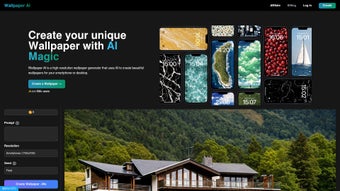
WallpaperAI is a cutting‑edge, web‑based application that harnesses artificial intelligence to create stunning, high‑resolution wallpapers tailored to each user’s taste. By simply selecting a desired resolution—ranging from Full HD (1920 × 1080) to 5K (5120 × 2880) for MacBooks—and typing a creative prompt, the AI engine instantly produces a unique visual masterpiece. The service runs entirely in the browser, meaning there’s no need to download bulky software; all processing happens on WallpaperAI.io’s cloud servers, keeping your device light and responsive.
While the platform follows a subscription model that uses internal credits for every wallpaper generation, the speed, upscaling quality, and flexibility make it a compelling choice for designers, gamers, and anyone who wants a fresh desktop or mobile background without the hassle of manual editing. The tool also supports a variety of aspect ratios, ensuring that the output fits perfectly on desktop monitors, ultrawide screens, laptops, tablets, and smartphones. Because the AI model is continually updated, users benefit from the latest generative techniques, resulting in crisp textures, vibrant colors, and compositions that feel both artistic and personalized.
In addition, WallpaperAI respects user privacy by processing all images on encrypted servers, and it offers a transparent credit‑based pricing structure that lets you pay only for the creations you actually need. Whether you’re looking for a minimalist abstract pattern, a photorealistic landscape, or a futuristic cyber‑punk cityscape, WallpaperAI provides a fast, secure, and affordable way to turn imagination into a high‑quality wallpaper that matches the exact resolution of your device.
Features, Installation & Compatibility
Key Features That Set WallpaperAI Apart
- AI‑Driven Generation: Uses state‑of‑the‑art diffusion models to interpret natural‑language prompts and turn them into visually rich wallpapers.
- Multiple Resolutions: Supports Full HD, WQHD (2560 × 1440), 4K UHD (3840 × 2160), and 5K for MacBooks, plus custom aspect ratios for phones and tablets.
- Instant Upscaling: Built‑in upscaling algorithm enhances low‑resolution outputs to crisp, high‑definition quality without visible artifacts.
- Prompt Customization: Users can fine‑tune style, color palette, and subject matter by adding descriptive keywords to their prompts.
- Browser‑Based Interface: No installation required; works on any modern browser with JavaScript enabled.
- Secure Cloud Processing: All images are generated on encrypted servers, ensuring privacy and protecting user data.
- Subscription Credits: Flexible credit system lets users purchase only the amount of generation power they need.
- Cross‑Platform Compatibility: Generates wallpapers suitable for Windows, macOS, Android, and iOS devices.
- Regular Model Updates: The AI engine receives frequent updates, bringing new artistic styles and improved realism.
Why AI Makes a Difference
Traditional wallpaper creation often requires graphic‑design expertise, expensive software licenses, and a lot of time. WallpaperAI eliminates those barriers by translating a simple text description into a high‑resolution image in seconds. The AI model has been trained on millions of images, learning how light, texture, and composition interact across different themes—from minimalist abstract patterns to photorealistic landscapes. This depth of knowledge enables the system to generate visuals that feel hand‑crafted, yet are produced at a fraction of the cost and effort. Because the tool runs in the cloud, you can experiment with multiple prompts without slowing down your own device, making rapid iteration effortless.
Installation & Usage Instructions
Since WallpaperAI is a web‑based service, the installation process is virtually nonexistent. Follow these straightforward steps to start generating wallpapers:
- Open Your Browser: Launch any modern browser (Chrome, Edge, Firefox, Safari, or Opera) on Windows, macOS, Android, or iOS. Ensure that JavaScript is enabled—most browsers have this turned on by default.
- Visit WallpaperAI.io: Navigate to the official site. You’ll be greeted by a clean dashboard that guides you through the creation process.
- Create an Account: Sign up with an email address or use a single‑sign‑on option (Google or Apple). After verification, you’ll receive a starter credit bundle.
- Select Resolution: Choose from the preset resolutions or enter a custom width × height for unique devices.
- Enter a Prompt: Type a descriptive sentence or keyword list (e.g., “vibrant abstract geometry with teal accents”). The AI will interpret this input.
- Generate & Download: Click “Create.” The AI processes the request in seconds, then presents a preview. Click “Download” to save the PNG or JPEG file to your device.
Operating System Support
WallpaperAI works seamlessly on all major operating systems that support a modern web browser, including:
- Windows 10/11 (Chrome, Edge, Firefox, Safari on Windows)
- macOS 12+ (Safari, Chrome, Firefox)
- Linux distributions with Chromium‑based browsers
- Android 8+ (Chrome, Firefox, Samsung Internet)
- iOS 13+ (Safari, Chrome)
Because the heavy lifting occurs on remote servers, even low‑end devices can generate 4K or 5K wallpapers without lag. The only technical requirement is a stable internet connection and JavaScript enabled in the browser.
Tips for Optimal Use
- Be Specific: The more detail you provide in your prompt, the more accurately the AI can match your vision. Include style cues (e.g., “minimalist line art”) and color preferences.
- Use High‑Contrast Keywords: Words like “vivid,” “soft,” “dark,” or “neon” guide the AI’s tonal balance.
- Leverage Aspect Ratios: If you plan to use the wallpaper on a dual‑monitor setup, select a custom resolution that matches the combined width.
- Refresh Credits Wisely: Purchase credit bundles that align with your generation frequency; larger bundles usually provide a discount per wallpaper.
- Secure Your Downloads: All files are delivered over HTTPS, but it’s good practice to scan the downloaded image with your preferred antivirus before setting it as a background.
Pros, Cons & Frequently Asked Questions
Pros
- Instant, high‑quality wallpaper generation from simple text prompts.
- Supports a wide range of resolutions up to 5K, suitable for modern displays.
- No software installation; works directly in the browser.
- Regular AI model updates keep the visual style fresh and innovative.
- Secure, cloud‑based processing protects user privacy.
- Flexible credit system allows you to pay only for the wallpapers you actually use.
Cons
- No free tier; users must purchase credits or a subscription to generate wallpapers.
- Batch processing is not available; each wallpaper requires a separate credit.
- Dependence on an internet connection; offline generation is impossible.
- Limited control over fine‑grained image parameters (e.g., exact lighting direction).
- Credits can be consumed quickly if experimenting with many prompts.
FAQ
Is WallpaperAI compatible with macOS 5K displays?
Yes. WallpaperAI includes a preset for 5K (5120 × 2880) resolution, which matches the native resolution of the latest MacBook Pro models. Simply select the 5K option in the resolution dropdown, enter your prompt, and download the generated image.
Do I need a powerful computer to use WallpaperAI?
No. Because all rendering occurs on WallpaperAI’s cloud servers, even modest laptops or smartphones can generate 4K or 5K wallpapers quickly. The only requirement is a stable internet connection and a browser with JavaScript enabled.
Can I use the generated wallpapers for commercial projects?
Yes, the standard license included with your subscription allows commercial use of the wallpapers you generate, provided you do not redistribute the raw AI model or claim authorship of the underlying algorithm.
How are credits deducted?
Each wallpaper generation consumes a predefined number of credits based on the selected resolution and any optional upscaling. The credit cost is displayed before you confirm the creation, so you always know how many credits will be deducted.
What happens if my browser blocks JavaScript?
WallpaperAI relies on JavaScript for the user interface and for communicating with the AI backend. If JavaScript is disabled, the site will not load the generation tools, and you will see a prompt to enable it. Enabling JavaScript restores full functionality.
Conclusion – Is WallpaperAI Worth Your Credit Investment?
WallpaperAI delivers on its promise of turning simple textual ideas into polished, high‑resolution wallpapers in seconds. Its browser‑based approach eliminates the need for bulky design suites, while the AI engine produces results that rival handcrafted artwork. For users who value speed, flexibility, and the ability to generate unique visuals on demand, the subscription‑based credit system is a reasonable trade‑off—especially when compared to the time and cost of hiring a designer for each new background. The lack of a free tier may deter casual browsers, but the quality of the output, the breadth of resolution options, and the secure cloud processing make WallpaperAI a strong contender in the emerging market of AI‑driven creative tools. If you’re ready to refresh your desktop, laptop, or mobile screens with personalized art that reflects your imagination, click the link below to start your trial and unlock the power of AI‑generated wallpapers today.
Pros: Fast AI generation, high‑resolution support, browser‑only access, regular model updates, secure cloud processing.
Cons: No free tier, no batch processing, internet‑dependent, limited fine‑grained control, credits can be consumed quickly.



.png)



